AWSOM PixGallery Version 4.6.1
Examplegallery > Art >
Previous Archive
|
| Download the Current Stable Version: AWSOM Pixgallery 4.6.1 plugin |
| Download the Previous Stable Version: AWSOM Pixgallery 4.5.10 plugin |
The example archives on this page are designed using the AWSOM Pixgallery plugin version 4.6.X. The original Pixgallery plugin was written by Nathan Moinvaziri of nathanm.com. The AWSOM version is a collaboration between Mr. Moinvaziri and myself.
Some of the features of this plugin are:
- Easily Installed: AWSOM Pixgallery requires no theme editing and creates all tables, cache folders and default gallery folders for you with a single activation click on your plugin admin page.
- Drop and Go functionality: Upload your images into a folder on your server, put a code in a post or page (which Pixgallery can generate for you), and immediately have an automatically created gallery with thumbnails, watermarks, news post interlinks (when used with the Comicpress theme system) pagination and more in seconds.
- Easily Updated: Adding or removing images is as simple as adding them to the original folder–Pixgallery detects the new or changed images and adds them into your gallery with no work on your part. You can even add entire new folders of images just as easily by uploading them.
- Easily Add Metadata: Click on the link under any image (when logged into your site) and immediately go to a page to input custom names, tags, links, etc.–all using the New Advanced Visual Editor or code view editor. Now you can also display Photo EXIF data and IPTC data automatically.
- Easily present the images the way you want: Pixgallery can show your images in alphabetical order, the order they were added to the gallery, by numerical sort or the reverse of any of these types. Also add CSS options directly through the admin interface to theme your gallery to more closely match your website theme, or to show off your gallery in a special way.
- Show off your best work: Use the Custom Gallery Image system to have any image you want represent the folder icon for a gallery.
- Show Review Galleries like the Big Guys: Pixgallery can limit the thumbnails of galleries in your posts to a set number, with a “click to see more” link beneath, just like all of the major review sites–you can also choose to show names and captions with the images or simply present the images by themselves.
- Full Control over Image sizes and display: You choose the thumbnail size and Pixgallery creates them for you. You can even limit the “full size” images to match your theme’s width–All With the expected range of pop up window, open in new window, or “lightbox” new layer effects to display the actual full sized image. You can even set to automatically have Pixgallery hide your sidebar area to show more of your images in your gallery.
- Get Quick Feedback:You can optionally turn on the Individual Feedback system to have all comments placed on a gallery page or post “sticky” to the image or folder they were entered against, this sytem integrates directly with Wordpress’s own comment system so all of your regular comment addons work with it, and all of your protections still work to keep your galleries spam free. And Yes, it works with the new WordPress 2.7 Nested comment system!
- And many more features, with active and fulltime development ongoing. Your feedback has added directly to the feature set of AWSOM Pixgallery and is taken seriously. We want Pixgallery to be the easiest and best solution to adding an Image, webcomic, or photo gallery to your Wordpress install.
View The Video Tutorials for this plugin
Read The AWSOM Pixgallery Install Guide
Read The AWSOM Pixgallery Options Guide
Read the AWSOM Pixgallery FastFlow Usage/Workflow Guide
Read The Plugin Troubleshooting Guide
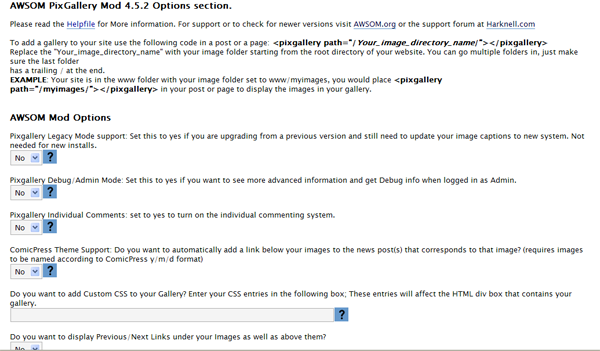
Here’s a picture of the New Admin functions:
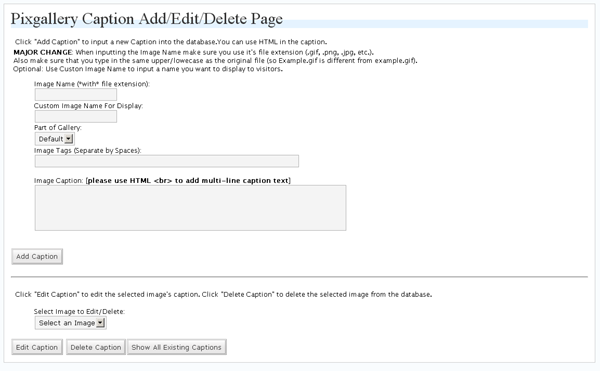
Here’s a picture of the Write page to enter Captions:
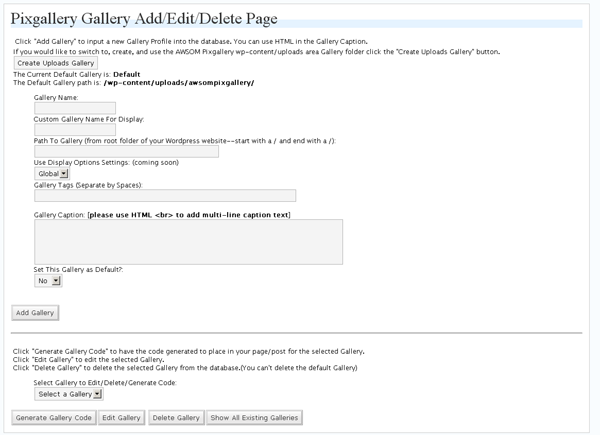
Here’s a picture of the Theme page to enter Galleries:


Hey, first time user of the plug in, Wanted to know how to make all the pictures get closer together. They have to much space between them? Can not find a adjustment?
Hi, You have a few options. If you open the file pixgallery.css in the plugin directory you could play around with the entries to get more of the spacing you want. Alternately you could add more images per row, or adjust the size of the thumbnails.
[...] Plugin ?????? :- PhotoXhibit AWSOM PixGallery Plugin ?????? :- AWSOM PixGallery Plugin Falbum Gallery Plugin ?????? :- Falbum Gallery Plugin Lazyest Gallery Plugin [...]
I just did a search of the WP plugins for “awesom pixGallery” but is doesn’t show up any more. What’s the deal???
hi,i set to yes to turn on the individual commenting system,but i want to comments shown on a same page too.Could u teach me how to do? Sorry my english is very poor, i hope u can follow me.
Hi,
Are you asking to have the individual comment system active, but also have all of the image/gallery comments also show up on one page as well? Currently there’s no way to do that within the plugin. I’m not really sure how that would actually work out. Would you want all of the comments to be on the top level gallery page? They wouldn’t make that much sense to people though, and obviously people couldn’t comment directly on the main gallery page.
Thank you four your reply.I just want to display like picasa:http://picasaweb.google.com/JesseSimmers.Anyway,thx for the great plugin.
hi,if i just display comment textbox and individual comment on img pages,and show all comments on one gallery page,how can i do?
Please do not send any more reply’s to my question! All new comments and questions should be directed to http://www.awsom.org/about/awsomorg-submit-news-page/
Thanks
[...] AWSOM Pixgallery Art/Webcomic plugin [...]
hi,
interested with your plugin. can it be configure to show my foodies in a page like tastespotting or notcot? thanks.
I’m not sure exactly what you are asking. Do you mean in a gird fashion? Or do you mean submitted photos? There’s no upload function in the plugin to allow people to upload photos. But you could drop them into a folder and they’ll show up. You can play around with the CSS file for the plugin to make it look anyway you want it to.
I’m trying to just layout three seperate galleries on one page, one for art, one for fanart, and one for pictures
The appropriate pictures are in the appropriate folders in my FTP but only the first
Shows up, even though I put right under it, but the /fanart/ doesn’t show up.
Hi, if you mean you want three separate gallery codes to work on one page, that doesn’t work in pixgallery. If you want three separate gallery folders to appear, which the user can then click to go to each specific gallery, then all that requires is placing the pixgallery code directed to the folder that all three are within.
Ok, so if I put all three galleries in folders inside a folder (IE:/galleries/ had 3 folders in it, Gallery, fanart and whatever) I would point the code to /galleries/?
Yes, that worked. Thank you!
Damn, nope. Now I just have file folders. In previews it seemed to work but now it’s just showing the directories.
Hi. I can’t get Lightbox working. It’s just opening the large image inline. I’ve tried the option to open in a new floating window as well, but that’s not working – just opening inline in the same page, as if I had all js disabled.
I tried using the Fancybox plug-in instead and disabling all js in PixGallery, but that won’t work either.
Do you have any ideas? Presumably there’s a js conflict somewhere, but disabling all other js except swfobject still doesn’t solve the problem.
Check the page out at http://www.rahimlive.com/?page_id=1026&px=%2FA%2FAC_DC%2F
Hi, Please try the standard set of checks to see if things are conflicting. First try using the WordPress default theme. Then turn off all other plugins and try. Once you know what’s causing the issue it can be solved. You can also totally drop out the pixgallery js file by renaming or deleting it from the server.
In an effort to streamline work flow, is it possible to integrate pixgallery directories into the standard WordPress media tool to allow multiple postings of portfolio images in other parts of the site?
Hi there, everything but the automated thumbnail generating seems to work brilliantly – I only get a “?”, and a clickable name (which, when clicked, oddly enough opens the original image, so it must be the thumbnailing that fails). Any suggestions?
Using WP2.9. No experience with html or the like…
Generally the issue of Thumbnails not appearing has to do with the path to the cache folder being set wrong in the settings area. Your server may require a forward slash / in front of the path to the cache folder. Try that first.
Sweet, now I see thumbs and everything. BUT when I click the thumbs, the image scales beyond the values I entered under “Gallery Images”. In fact, no matter what values I enter, it enlarges to the documents orignal size, and doesn’t respect the values in pixgallery settings.
Any ideas?
Hi, are you using the lightbox to display the images? Or does it go to the single image view page? There are different values depending on if it’s lightbox, intermediate thumb, or full size image. This is especially true if you are using a 3rd party lightbox plugin.
Installed your plugin and now my site has slowed to a crawl. Deactivate your plugin and site works fine again…any ideas? I really like this plugin and would like to figure out what’s going on.
Thanks
Most of the time this slow down is caused by a php timeout issue. What this means is the plugin script is not allowed access to some of the images on your site, and is waiting for the timeout to occur to stop bothering trying to do something. Typically this is due to injected image advertising that appears within a post or part of your page. Pixgallery is trying to look at that image to see if it needs to be resized, but since the image isn’t on your server (it’s on the advertising server somewhere) it is failing and waiting for the timeout to occur. I don’t really have a fix I can provide right now for this issue. The design of the plugin by the original developer has this as a core issue, so it’s a bit of a difficult fix for me at this point. I guess maybe a different gallery plugin might be a better fit for you at this point.
Ya, I have hundreds of images from photobucket and some from various other places. Do you know of any other plugins that follow the same concept as this one (allowing galleries from folders already on the server)?
Thanks for any advice
Perhaps you could add a simple IF statement around the block of code that makes that check and then on the options page let the user’s enter the page/post id’s not to perform that check on??? Just a thought…
Unfortunately it’s not that simple. The way the plugin works is built around the scanning for images. I’ve been searching for a way around this for awhile but haven’t found the key to it yet.
I have looked at a bunch of plugins and I can’t find any similar to this one. Do you know of any?
Thanks
[...] Check it out here :- AWSOM PixGallery Plugin [...]
[...] AWSOM PixGallery Plugin [...]
thanks for the demo. I am going to try it. I am new to wordpress so thanks for the help.
30 Risorse gratis per Photoblog con Wordpress…
Volete creare un album fotografico on line? Wordpress sembra fatto apposta ed offre una serie di plugin gratis per farlo. Ce ne sono per tutti i gusti. Dal plugin più semplice al più sofisticato. Dipende tutto dall’utilizzo che se ne vuole fare…
[...] spent most of free time over the last few days adding a gallery to the blog. For this I selected Awsom Pix Gallery because it seemd to be the simplest and least invasive. I like the built in wordpress image [...]
[...] Tutorials: Setup Tutorials Download WordpressGet A Theme:ComicpressTheme DatabaseGet AWSOM Plugins: AWSOM PixGallery 4.6.0 AWSOM News Announcement 1.5.2AWSOM Archive 1.4.2AWSOM Uninstaller 1.0.3Search For New [...]
[...] AWSOM PixGallery [...]
[...] Tutorials: Setup Tutorials Download WordpressGet A Theme:ComicpressTheme DatabaseGet AWSOM Plugins: AWSOM PixGallery 4.6.0 AWSOM News Announcement 1.5.2AWSOM Archive 1.4.2AWSOM Uninstaller 1.0.3Search For New [...]
[...] PixGallery – I have stopped using this plugin as it resized images in posts as well due to which they [...]
[...] Awsom PixGallery: Este plugin te ayuda a crear un archivo de imágenes a modo de galería. Soporta theme Comicpress, automatiza las marcas de agua a las imágenes, etc. [...]
[...] Awsom PixGallery: Este plugin te ayuda a crear un archivo de imágenes a modo de galería. Soporta theme Comicpress, automatiza las marcas de agua a las imágenes, etc. [...]
[...] Awsom PixGallery: Este plugin te ayuda a crear un archivo de imágenes a modo de galería. Soporta theme Comicpress, automatiza las marcas de agua a las imágenes, etc. [...]
Usually if the preview works but the actual page doesn’t, you might be having a plugin or other conflict. Do you have a link to the page so I can see what it looks like?
I fixed it. I had to turn on Absolute links or whatever it was called. Sorry for the trouble.